AI + Design Systems · Fluent Flex design repository
First, Prove the Model Could Read the Tokens
Before anyone trusted an AI to build a Fluent component, someone had to prove a model could actually read our token system and apply it correctly on its own. That was my job. This is the evals, the token skills I built off them, and the pressure test where we ran the whole repo under load at once.
- Role
- Tokens across the AI pipeline: the evals, a model-readable skill per token category, and the token-integrity fixes that came out of component trials
- Repository
- fluent-design repo (internal GitHub)
- The team
- RepoPipo. Lydia Mitchelson (repo bet and architecture), Mitch Fraser (lead UXE), Toshie Rashtavie (Figma pipeline), Jack Zankowski (design manager), me (tokens)

By the numbers
Results
3
Models the token schema was evaluated against: Claude, ChatGPT, and Copilot
6
Token categories built into model-readable skills to start (color, type, spacing, radius, elevation, grid), and growing
14
Component trials in, recurring drift forced a real architecture and put the token source on trial
55
Components shipped and counting, built on the model the pressure test validated
Origin
The bet wasn't mine. The proof was.
The repo move was Lydia's idea, and it was a good one: if Fluent lived in a repository instead of scattered across Figma and code comments, a model could read the system directly instead of guessing from whatever artifact it hit first. She pitched it, she architected it, she owns it.
She needed a first pressure test. I had a pile of token documentation I'd written for the semantic token system, and I brought it to her. That became the first real thing we put in the repo, and the first honest test of whether the whole bet held up.
Tokens were the right place to start, and not by accident. Everything resolves down to them. Every component, every variant, every state, every platform binds back to a token. So if a model can't read the tokens correctly, nothing you build on top of them is trustworthy. Prove the foundation is legible, or don't bother with the rest.
The question
What we were actually testing
The button was our first test case, on purpose: it's the most important component in the system, and Toshie built it out in full. But proving a model can assemble a button from a spec was never the hard part. The hard question was this: can a model reason over a semantic token system and apply the right token when nobody hands it the answer?
A semantic token name is a design decision compressed into a string.
--gnrc-color-foreground-danger is only useful if the thing reading it
understands what danger means, what foreground means, and how it differs from the danger
token that fills a surface or the one that signals a hover state. A human designer fills
those gaps with context. A model either has the
structure to reason it out, or it fabricates something plausible and wrong. We wanted to
know which.
Put another way: could we turn tokens from theming and consistency into an executable design language, one a model could reason over and build correct UI from? That was the bar.
The proof
The evals
Before any of this, the tokens had to be worth reading. The system we built had moved from selecting values to defining relationships: color rebuilt on an OKLCH model for perceptually uniform ramps, elevation on an exponential formula instead of hand-tuned presets, radius and spacing on semantic tiers tied to component hierarchy. Mathematically derived, not eyeballed. That's what made them testable at all.
So Lydia and I put them on trial. We ran a three-step eval across Claude, ChatGPT, and Copilot: translate the human docs into a machine-readable schema, poke it with the source docs stripped away so a right answer had to come from the structure and not the training data, then scale it to messier token sets to see if it still held. The bar was never "can a model generate something that looks right." It was "can a model reason from our token system and get the answer right when nobody hands it the answer." It could. And where it broke, it showed us exactly which token names carried an assumption a model couldn't infer, which is how the evals made the tokens better.
What I built
The token skills
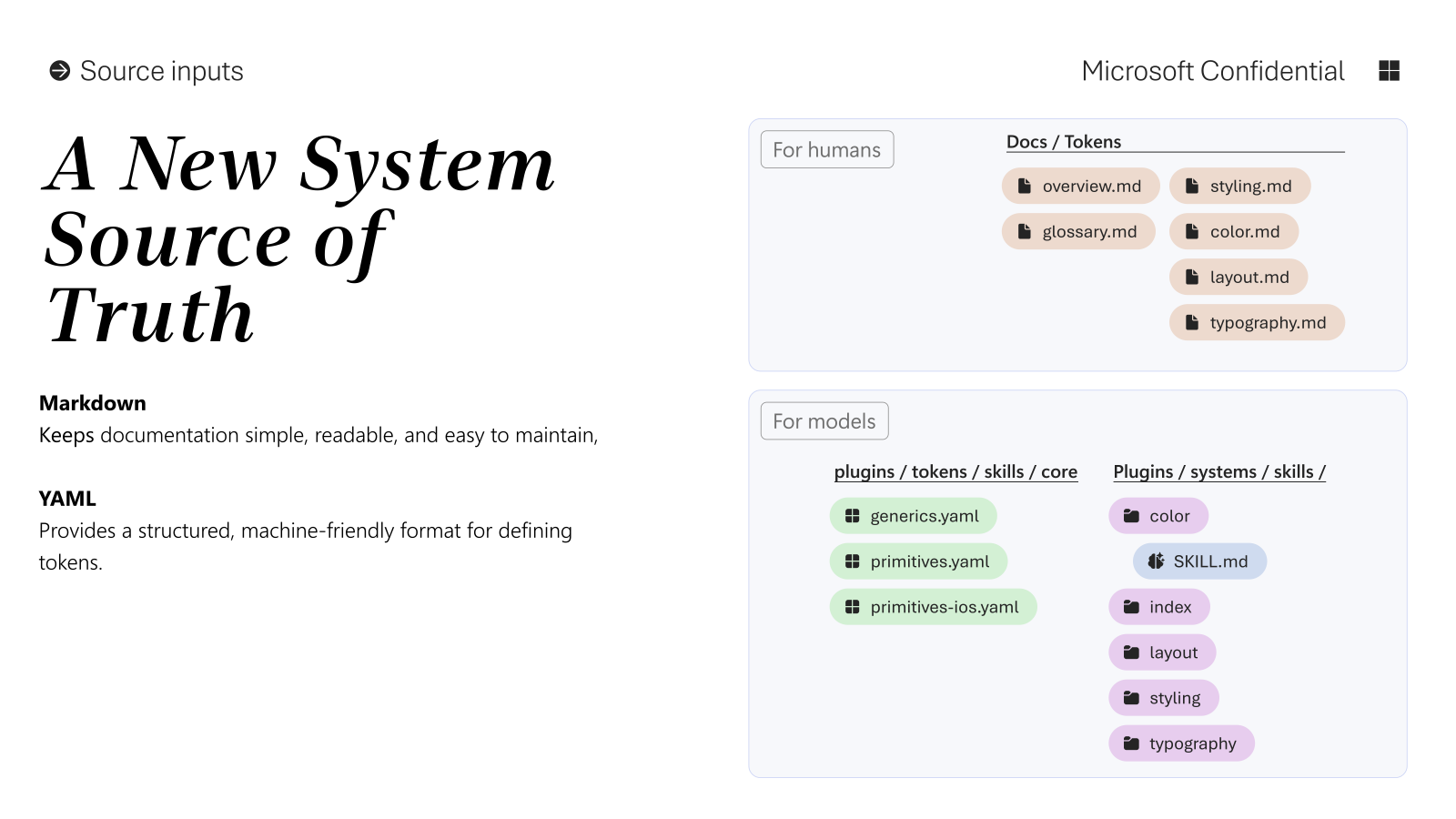
Off what the evals exposed, I built the token knowledge into the repo in two halves, the same split the evals proved a model needs. The values live in YAML: one bindings file per category, strictly token name, value, and platform overrides, nothing to interpret. The reasoning lives in a system skill beside it: what the tokens in that category mean, how they relate, and how a model should decide which one applies. Deterministic data in one file, the decisions in the other, so a model reads both and never has to guess which is which.
I wrote these for color, type, spacing, radius, elevation, and grid to start, and the set grew as the system matured: motion came in, and the shape and depth work regrouped, with Shape now holding radius and stroke, and Depth holding elevation and materiality.
What a reasoning skill actually does is encode the call a designer would make so a model can make the same one. From the color skill, on keeping surface and background straight:
Surface tokens define the structural plane a component sits on; background tokens define
fills, status color, selection, and interaction feedback inside that plane. Any
--gnrc-color-surface-* assignment belongs under tokens.surface
in tokens.yaml, not under tokens.background, even when the
eventual platform property is named background-color.
That last clause is the whole point. The model resolves by what the token means, not by what the platform happens to call the property. That is the difference between a token a model applies correctly and one it fumbles the second the naming gets slippery.
Two more proofs came off the same foundation: we used AI to automate accessibility checking between foreground and background color tokens, and to work out how to build a grouped token that followed our naming schema. Neither is possible unless the tokens are structured for a model to reason over in the first place. That was the point of all of it.
The pressure test
The tokens under load
The real test of the token layer ran from late March through May: a stretch of component trials that put every part of the system under load at once. The spec schema and file architecture, the doc-site generation, the Figma build, and the token layer. Fourteen components in, the recurring drift across specs, demos, and output forced a real architecture, with one rule underneath it that made the whole thing testable: generation runs clean-room, with no memory of past output, so a clean build proves the source was actually complete instead of quietly hiding its gaps.
At the start we split by discipline: Mitch drove the repo and the spec-schema authoring, and I tested the output in Figma. Then I crossed over and started authoring component spec schemas myself. That's the point where my hands were in the token layer directly, not just checking it from the outside.
That rule is what put the token layer on trial. When a component came through without a design reference, the model had to assign tokens from my skills alone, and the trials are where I found out whether the skills and the source behind them held. They surfaced real gaps.
The sharpest: tokens.yaml had been carrying a computed value, a resultant
height derived from the type tokens, stored as if it were authoritative. The moment the
type inputs changed, that number went stale, and the pipeline reproduced the stale value
faithfully. The fix was a discipline call, not a patch. The token file keeps only
authoritative bindings and the non-obvious rationale, nothing derived. Anything computed
moves to a shared skill that owns the formula, so it recalculates instead of rotting.
Same principle, different failure. Stale Figma keys, renamed collections, and a generic token that didn't actually exist were breaking the build preflight. I validated the integration keys, consolidated the token docs, and picked a real canonical overlay token so the pipeline had something true to bind to.
The pattern under all of it: derived facts and duplicated prose drift fastest. A token system a model can trust has to store inputs, not cached conclusions. That is the difference between a token file that looks right and one that stays right when the system moves. Catching that isn't something you can automate. It's the job.
One more call from that stretch was mine, and it was a call to stop. The Figma Plugin API couldn't create native content slots, which meant full automation would quietly produce structurally wrong components. The honest architecture there wasn't a workaround. It was a human checkpoint: a visible placeholder, a manual conversion, then a verification step. Knowing when not to automate is part of building for AI, not a failure of it.
The clearest sign the foundation held came from outside my own hands. Jack pressure-tested it from a different angle: he built output skills for generative UI straight on top of our foundations, our token skills, and our component specs. He identified the block layouts and components that showed up most often, then wrote a skill that composed them using our grid, spacing, and the rest of the token system. It worked, and worked well. His skill read our token skills and component specs as fluently as it read the layouts, which is the whole proof: the system was legible enough that someone else could build generative UI on it and trust what came out.
Thanks for being the dots to my lines. You bring deep vertical expertise I'll never match, and you let me bridge it outward, generous about that exchange with everyone instead of protective of it. Most people with your depth want to keep the depth but you make sure to invite people in and multiply it.
Impact
Before & After
Before
Legible to a designer, sort of legible to an engineer, and a coin flip to a model, which would read whatever it found and fill the gaps with a guess. There was no way to know if a model understood the system short of eyeballing every output by hand.
- Prose docs, written for people
- A model guesses at anything a name doesn't spell out
- Misreads are silent until you catch them by eye
- No way to test whether the system is legible at all
After
Structured for a model to reason over, verified by evals, and pressure-tested on real components. When a component needs a token, the model reads the skill and assigns it. When it gets it wrong, the miss is visible and fixable instead of silent.
- YAML bindings for the values, a system skill for the reasoning
- The decision tree lives in the tokens, not the prompt
- Evals prove the structure carries the reasoning
- The foundation is legible on purpose
Process
How It Came Together
- 01
Build the tokens
The semantic, mathematically derived token system my team built. This is the thing everything else in the repo stands on. See the tokens case study for how they were built.
- 02
Run the evals
With Lydia. Test how well Claude, ChatGPT, and Copilot reason over the token names and apply them, with and without docs. Find where the naming carries invisible assumptions.
- 03
Split the tokens into model-readable skills
YAML bindings for the values, a system skill for the reasoning, one pair per category. Deterministic data in one file, the decisions in the other.
- 04
Put the tokens under load
Through the spring component trials, the clean-room generation pipeline exposed where the token source drifted: a stale derived height, broken integration keys. Correct the source so it stays the authoritative contract, not a cache.
- 05
Close the gaps
Every miss points at a naming or skill fix. Make the fix, tighten the system, run it again.
- 06
Scale
The validated model becomes how the team builds the rest of the library, now 55 components and counting.
In the end
What I Own
The token layer, end to end: the naming, the evals that proved a model could reason over it, the skills that made it consumable, and the pressure test that proved it held when a model had to apply it with no human in the loop. Lydia's idea and architecture made the repo possible. My job was proving the foundation underneath it was real.
That's the kind of work I reach for. Build the layer everything else stands on, then verify it actually holds before anyone leans on it. Structure before surface. It's the same reason I'd rather fix a house's bones than repaint the walls.